Field stations everywhere · March 15, 2026
Camera Trap Software Compared
What actually works in the field, and what doesn't
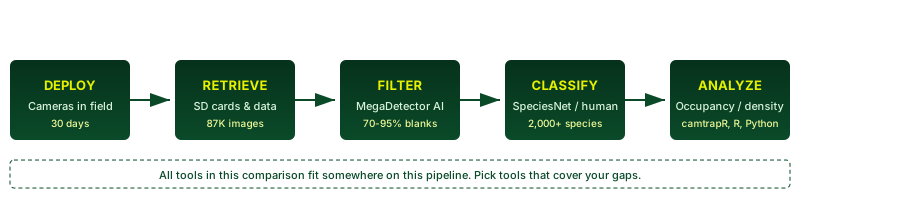
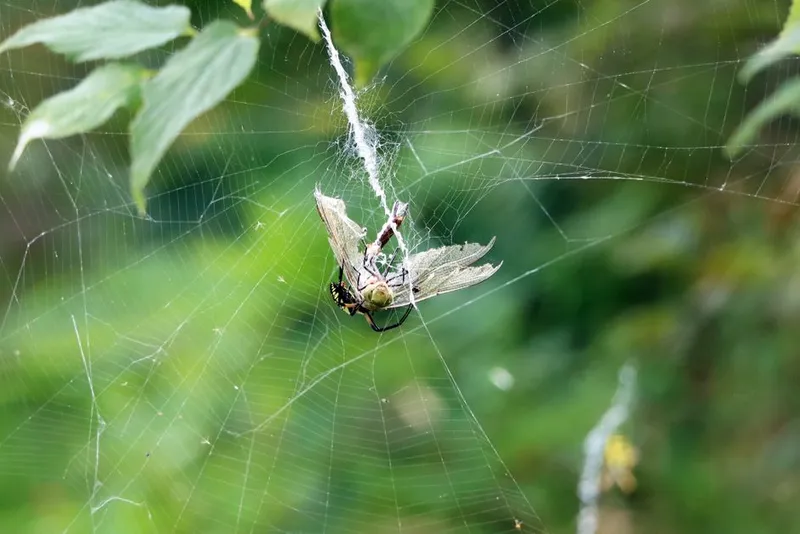
Your camera traps just came back from three months in the field. You have 87,000 images across 24 cameras. Based on the first hundred you spot-checked, maybe 15 contain animals. The rest are wind-triggered grass, heat shimmer, and one very determined spider that built a web across the sensor.
You could spend the next two weeks clicking through blanks. Or you could pick the right tool and be analyzing occupancy models by Thursday.
Here is every major option, compared honestly. Each section names the tool, links to it, and gives you the unvarnished truth about what it does well and where it falls short. No hype. No marketing. Just what works.

Wildlife Insights
is the all-in-one cloud platform. Upload images, get AI species predictions across ~2,000 species (powered by Google’s SpeciesNet ensemble), review in-browser, download results. Built by a consortium including WCS, Google, Smithsonian, WWF, and the Zoological Society of London.
What it does well: Best-in-class species coverage — no other tool identifies as many species out of the box. Zero setup. Create an account, upload, and the AI starts working. The geofencing feature actually improves accuracy by ruling out species that do not exist in your region (no, that is not a kangaroo sliding down a waterfall in England). Good sharing and collaboration features for multi-institution projects.
Where it falls short: Cloud only. If you are working from a field station with satellite internet, or your data contains rhino coordinates you legally cannot upload to a US server, this is a non-starter. The free tier is generous for academics, but government agencies and companies pay — pricing is opaque and determined by negotiation. The review interface is functional but slow compared to a native desktop app. You cannot customize the AI model for your ecosystem. No offline mode.
Best for: Organizations that want a zero-install, managed solution. Projects where data sharing is the goal. Teams that do not have sensitive species locations or data sovereignty constraints.

MegaDetector
is not a platform. It is an AI model built by Microsoft’s AI for Good Lab. It detects animals, people, and vehicles in camera trap images. It does not identify species. It is a blank-filtering engine — and it is the best one available. V6 was released in May 2026.
What it does well: Removes 70–95% of your empty frames before a human looks at anything. V6 is fast — the compact variant is 2.3M parameters and runs on a laptop CPU (~2–5 images/sec). The larger variants hit 83% animal recall and run at 100–200 images/sec on a GPU. Free, open source (MIT), runs offline, and integrates with almost every tool in this list. Three ways to run: Python API (three lines), CLI (one command), or GUI via AddaxAI. Used by 80+ organizations worldwide.
Where it falls short: Detection only — no species ID, no review interface, no data management. Using it directly requires Python or CLI comfort (AddaxAI solves this for non-programmers). Accuracy varies by ecosystem: it sees large mammals in open habitat better than small, distant, or camouflaged animals. Test it on your own data before trusting the numbers.
Best for: The first step of any pipeline. Run MegaDetector before anything else. It compresses your dataset so everything downstream moves faster. If you adopt only one tool from this article, make it this one.

Timelapse (Timelapse2)
is the desktop review workhorse. A Windows application built by Saul Greenberg, professor emeritus of Computer Science at the University of Calgary, over 15+ years. Think of it as a specialized image viewer designed for the specific task of turning camera trap images into structured data. Free and open source.
What it does well: Extreme flexibility. You define your own data fields — species, count, age class, behavior, weather, whatever your protocol demands. Imports MegaDetector JSON output natively: bounding boxes, confidence scores, and species labels appear in the review interface automatically. Excellent efficiency features: persistent zoom and pan across images, bulk data entry, keyboard navigation, time-based grouping of burst sequences. Fully offline. Free. Backed by peer-reviewed HCI research published in Ecology & Evolution (2019) and demonstrated to produce measurable efficiency gains in controlled studies.
Where it falls short: Windows only. This is a significant limitation — no Mac, no Linux. The UI looks its age. Single-user desktop app with no built-in collaboration. No AI inference of its own — you must run MegaDetector separately first. Template setup requires upfront work, though the defaults handle common use cases.
Best for: Researchers who need complete control over their data schema. Offline field work. Teams that want human-in-the-loop review with AI pre-filtering. Anyone who processes tens of thousands of images and needs efficiency.

Camelot
takes the database approach. Open source (Eclipse Public License), built by Chris Mann and Heidi Hendry in Sydney. Camelot is a desktop application with a web-based interface that structures your camera trap operation as a proper database: cameras, sites, surveys, sightings — all related. Recommended by WWF in their camera trapping guidelines.
What it does well: Multi-user support out of the box — run it on a local network and multiple people can classify simultaneously. Strong data integrity with metadata validation and relational structure. Reports export directly to PRESENCE and camtrapR formats. Free and open source. 1,842 commits on GitLab — this is not abandonware.
Where it falls short: The web interface adds friction compared to a native app. AI integration is limited — it can import MegaDetector output but the workflow is not as seamless as Timelapse. Development pace appears slow; the last release was version 1.6.16 with no clear public roadmap. Smaller community than Timelapse.
Best for: Team-based projects that need structured, relational camera trap data. Groups already using PRESENCE or camtrapR for analysis. Organizations that want open-source, local-first database management with multi-user support.

AddaxAI
(formerly EcoAssist) is AI without code. A desktop GUI that wraps MegaDetector and 20+ regional species classifiers into a point-and-click workflow. Built by Peter van Lunteren at Addax Data Science. Runs on Windows, Mac, and Linux. Free and open source.
What it does well: Zero programming required. Install, point at a folder, and it runs detection and classification in one go. GPU acceleration works on both NVIDIA and Apple Silicon. The regional model library is genuinely impressive: 135-class Australian model, 328-class Sub-Saharan drylands model, 68-class US Southwest model, 84-taxa Neotropical model, and many more. Exports to Timelapse format. Fully offline after installation.
Where it falls short: Regional model accuracy is uneven — some were trained on narrow datasets and will not generalize to your site. You need to test each model on your data before trusting it. The species models are static; you cannot fine-tune them through the GUI. As a wrapper, it depends on the underlying models staying current.
Best for: Field biologists who want AI assistance without learning Python. Projects in regions with a matching species model. Anyone who wants MegaDetector and species ID in one install with a GUI.

SpeciesNet
is the species classifier behind Wildlife Insights — available standalone. An
ensemble of MegaDetector (detection) and Google’s SpeciesNet classifier
covering 2,000+ species labels. You run it locally via Python (
pip install speciesnet). Apache 2.0 license.
What it does well: Most comprehensive species coverage of any classifier. Geofencing using ISO 3166-1 country codes improves accuracy by constraining predictions to species that actually occur where the camera was deployed. Taxonomic rollup means it predicts at genus or family level when species-level confidence is low — honest and practical. Trained on 65M+ images.
Where it falls short: Command-line and Python only for local
use — no GUI. The default ensemble script predicts one species per image (the
highest-confidence detection), which is a problem for multi-species images.
The alternative workflow (run_md_and_speciesnet) handles this but
is separate.
Best for: Users who want the same classifier Wildlife Insights uses but need to run it offline or in their own pipeline. Works as the classifier half of a MegaDetector + SpeciesNet two-stage pipeline.
TrapTagger
TrapTagger was developed by Panthera for camera trap data management with a focus on individual animal identification — stripe and spot pattern matching for tigers and other wildcats. As of June 2026, the website is unreachable and public access appears restricted. It is listed as a MegaDetector adopter in the Microsoft Biodiversity ecosystem but does not appear to be a publicly available tool.
Best for: Panthera collaborators. Not a general-purpose option at this time.
Side-by-Side
| Tool | Offline | AI Species ID | AI Blank Filter | Pricing | Learning Curve | Best For |
|---|---|---|---|---|---|---|
| Wildlife Insights | No | Yes (~2,000 spp) | Yes | Free (academic) / Paid (gov, companies) | Low | Managed cloud platform, data sharing |
| MegaDetector | Yes | No (detection only) | Yes | Free (MIT) | Medium (Python/CLI) | Blank filtering, pipeline component |
| Timelapse | Yes | No (imports MD) | Via MD import | Free | Medium | Flexible human review, offline work |
| Camelot | Yes | No | Limited | Free | Medium | Database-driven team projects |
| AddaxAI | Yes | Yes (20+ regional) | Yes | Free | Low | GUI AI for non-programmers |
| SpeciesNet | Yes | Yes (~2,000 spp) | Yes | Free (Apache 2.0) | Medium (Python) | Local species classification |
| TrapTagger | Unknown | Individual ID | Yes | Unknown | Unknown | Panthera collaborators only |

Which One Should You Use?
Start here: Run MegaDetector on your images first. It is free, works offline, and removes 70–95% of blanks before you spend a single minute reviewing. You can run it via AddaxAI (GUI, no code), the command line (one command), or Python (three lines). Do this before anything else.
Then, pick your path:
Path A — “I want it simple, offline, and free”:
Install AddaxAI (Windows, Mac, Linux)
- Run detection and classification on your images
- Export to Timelapse format
Review in Timelapse (Windows only — if Mac or Linux, review in AddaxAI itself)
Export CSV and analyze in R ( camtrapR) or PRESENCE
Path B — “I want maximum species coverage, can work online”:
Upload to Wildlife Insights
- Let AI classify across 2,000+ species
- Review and annotate in-browser
- Download data and analyze
Path C — “I have a team and need structured data”:
- Run MegaDetector on all images
Set up Camelot with your survey, camera, and species structure
- Import images and MegaDetector results
- Multiple reviewers classify simultaneously
- Export to camtrapR or PRESENCE for analysis
Path D — “I need maximum control and flexibility”:
- Run MegaDetector via Python or CLI
- Pair with SpeciesNet for species classification
- Review in Timelapse with custom data templates
- Export CSV and run custom R or Python analysis
The honest truth: Most camera trap software is free, built by scientists, and maintained on shoestring budgets. The tools work, but none of them feel like polished commercial software — and that is fine. The gap is not between tools. The gap is between what AI promises and what it delivers in your specific ecosystem. Test on your own data. Keep a human in the loop. And run MegaDetector first.
This comparison was researched and written June 2026. Tools change. Check
project websites for current status. If something here is wrong or outdated,
email us.