Cederberg Wilderness Area, Western Cape · December 5, 2026
Field Notes: A Week Testing Data
Collection Apps in the Cederberg
What actually works when the signal drops, the heat hits 38°C, and the baboons raid your camp
Dawn broke over the sandstone cliffs at 05:47. I was already up, hunched over a gas stove brewing coffee in the thin mountain cold. On the camping table in front of me: four Android phones, each running a different data collection app. FieldLog, CyberTracker, ODK Collect, and SMART Mobile. The phone running SMART had 10% battery and no signal. This was going to be interesting.
The plan was simple enough. Spend a week in the Cederberg Wilderness Area — 71,000 hectares of sandstone, fynbos, and UNESCO World Heritage landscape about 250km north of Cape Town — and test these four apps against each other in real field conditions. Not simulated conditions. Not “airplane mode on a bench in the Company Gardens.” Real conditions: no signal in the valleys, patchy 3G on the ridges, 38°C heat on the exposed slopes, dust in every charging port, and a troop of chacma baboons that took a professional interest in our breakfast supplies.
I want to be clear about what this is and what it is not. This is not a product review. It is not a spec sheet comparison. It is a field report — an honest account of what happened when we took four tools into a place that was specifically chosen to break them. We build FieldLog. We have skin in this game. But you need to know what broke, what held up, and what we changed because of this trip. If we cannot be honest about where our own tool fell short, we have no business building tools for people whose data actually matters.
The Setup
Four identical Tecno Spark Go devices — 1GB RAM, 8GB storage, Android Go edition. These are the phones people actually carry in the field, not the Pixel 8 Pro I use at my desk. Each phone had exactly one app installed: FieldLog, CyberTracker, ODK Collect, or SMART Mobile. Each was configured with a matching observation form: species, count, age class, sex, habitat type, GPS coordinates, photo. The same form across all four apps. The same transect routes. The same observer. The only variable was the software.
We stayed at Sanddrif, the holiday resort on the farm Dwarsrivier, home of Cederberg Private Cellar — the highest-altitude winery in South Africa. Sanddrif sits at the base of the Wolfberg, the massive sandstone massif whose cracked summit and freestanding arch define the Cederberg skyline. The campground has cold showers, unreliable electricity, and a dam cold enough to stop your heart. It also has a wine tasting room 400 metres from your tent. This last fact became increasingly relevant as the week progressed.
Day One: Arrival and First Transect
We arrived mid-morning, the N7 giving way to 17km of gravel road that rattled the Hilux’s suspension and coated everything in a fine red dust. The Cederberg in November is a study in contrasts: the fynbos is in bloom — proteas like pink fireworks, ericas in white and yellow, restios waving in the wind — but the heat is already building. By 11:00 it was 31°C and climbing.
First task: configure the observation forms. CyberTracker required the desktop Windows application to build the sequence — a hierarchical menu of icons that the field worker taps through. The interface looks like Windows 98 and the learning curve is steep, but the icon paradigm is genuinely brilliant for non-literate users. I built the form in about 40 minutes, swearing at the dropdown menus approximately 17 times.
ODK Collect uses XLSForm — you build the form in Excel, upload it to an ODK Central server, then download it to the phone. Conceptually clean. In practice, our ODK Central instance was running on a laptop in a tent with no internet, so the phone downloaded the form over a local Wi-Fi hotspot running off a power bank that was slowly dying. It worked, but “cloud-first form deployment” feels absurd when the cloud is a 2015 ThinkPad under a groundsheet.
SMART Mobile was the heaviest setup. Full desktop application required — you build a patrol configuration with spatial data, patrol routes, observation categories, and enforcement modules. The configuration process took two hours and generated a 47MB data package that had to be transferred to the phone via USB. This is a law enforcement tool pretending to be a data collection tool, and the setup weight reflects that. If you are managing a protected area with formal ranger patrols, the weight is justified. If you are doing ecological monitoring, it feels like bringing a fire engine to collect a water sample.
FieldLog: built the form in four minutes on my phone. Tapped “New Expedition,” described the observation protocol in plain English to the AI form builder, reviewed the generated fields, adjusted two things, deployed. I am aware this sounds like marketing. It is also what happened. The other three apps were still being configured when I had already logged my first test observation. This is not a flex — it is an acknowledgment that setup speed matters when your field team is standing around in the sun waiting for you to get the tools working.
We ran the first transect at 14:00, heading up the trail toward the Maltese Cross — a 5-hour round trip through classic Cederberg terrain. Sandstone steps, fynbos corridors, the occasional klipspringer materializing on a boulder and then vanishing before you can raise your binoculars. I logged observations on all four phones simultaneously: same species, same coordinates, same time. Each observation required me to stop, unlock the phone, navigate to the form, enter the data, and continue walking. This sounds trivial. After the 14th observation, it was not.
CyberTracker was the fastest in the field — genuinely fast. The icon grid means you tap through a sequence without reading. Tap the baboon icon, tap adult, tap male, tap healthy, confirm. Three seconds. The trade-off is flexibility: if the species you are logging is not in the pre-built icon sequence, you cannot log it without rebuilding the form on a Windows desktop. CyberTracker’s icon interface worked brilliantly until I had to log 14 observations of the same dassie species in three minutes. The repetition was fast but mind-numbing — no batch entry, no “same as last” shortcut, no count increment. Fourteen identical tap sequences, one after another, while the rest of the group walked ahead.
ODK Collect was precise but slow. The form-based interface is clear and the validation is excellent — it will not let you submit an incomplete record. But every field requires a deliberate tap or swipe. Dropdowns for species with 40+ options are tedious. After 20 observations my thumb was sore and my pace had dropped to roughly half the group’s walking speed. ODK is a form engine, not a field tool, and you feel the difference in every interaction.
SMART Mobile was the slowest by a significant margin. The observation form required navigating through nested patrol menus. Each observation had mandatory fields that made sense for law enforcement — patrol sector, threat level, action taken — but were irrelevant for ecological monitoring. I found myself entering “N/A” into required fields just to submit a dassie sighting. SMART is not bad software. It is just not designed for this job.
FieldLog was fast but I noticed something I had not noticed in testing: on this particular phone, with the screen brightness cranked to max to compete with direct sunlight, the GPS lock took noticeably longer than CyberTracker’s. CyberTracker uses a lightweight GPS call that grabs the last known location and updates it in the background. FieldLog was requesting a fresh fix on every observation. This was correct behaviour — fresh fixes are more accurate — but in practice it meant a 2-3 second delay per observation that CyberTracker did not have. I made a note. This would become important.
We returned to camp at dusk, sunburned and dusty. A pair of Verreaux’s eagles had been riding the thermals above the Wolfberg Cracks, and a Cape leopard had left tracks in the sand near the trailhead — fresh enough that I looked over my shoulder more than once on the walk back. Total observations across all four devices: 37 each. Total battery remaining: FieldLog 62%, CyberTracker 71%, ODK 45%, SMART 28%. The SMART phone had been running GPS continuously for patrol tracking, which explained the drain. But the ODK phone’s drain was worrying — the form rendering engine appeared to be keeping the CPU awake.
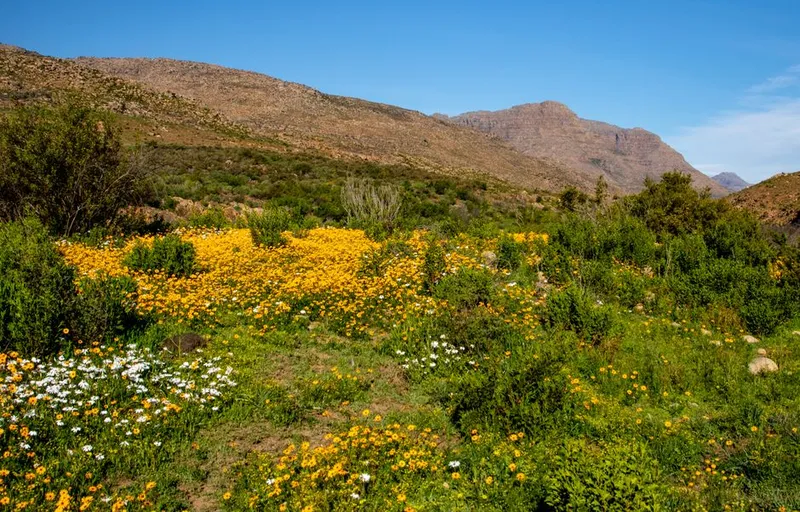
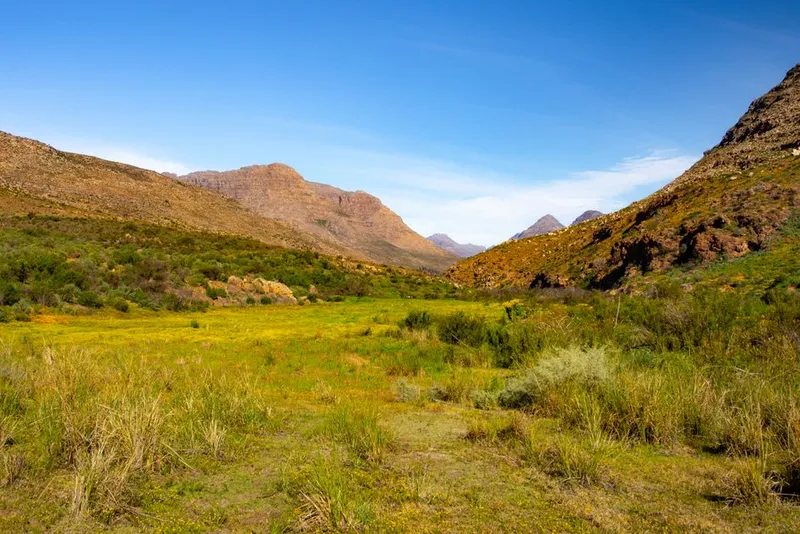
Day Two: The Valley With No Signal
We drove east at 06:00, heading into the Breekkrans River valley — deeper into the range, lower, hemmed in by sandstone walls on both sides. Cell signal: zero. Not “one bar if you stand on the roof of the Hilux.” Zero. The phones displayed “No Service” with a finality that was almost comforting. This was exactly what we came for.
The transect followed the river course, mostly dry, through thick riverine fynbos. Cape white-eyes worked the bushes. A boomslang crossed the path and disappeared into a rock crevice. We logged 52 observations per device over six hours, all offline.
Offline behaviour is where these apps diverge most dramatically.
CyberTracker was completely unfazed. It has been offline-first since 1996 — before offline-first was a term. Records saved to the local database without any indication anything was missing. The sync process, however, requires a Windows desktop. You connect the phone via USB, open the CyberTracker desktop application, and import the data. This is the 1996 architecture showing through. In the field, you cannot confirm your data has been backed up anywhere. You cannot sync to a server. You trust the phone and you hope. For a tool whose entire brand is “works in the bush,” the sync story is surprisingly fragile.
ODK Collect queued submissions locally and showed a pending count. This is good. What was less good: the app could not display previously-submitted observations while offline. The “View Sent” list was empty because the data lives on the server, not the device. If you needed to check whether you had already logged a particular dassie at a particular coordinate — a common field scenario — you could not. ODK treats the phone as a submission terminal, not a data repository. This is an architectural choice with real consequences.
SMART Mobile behaved identically offline as online, which is to say it logged patrol observations to its local database. The patrol tracking continued — GPS breadcrumbs stored locally. The problem was battery. Continuous GPS tracking plus no ability to sync and offload data meant the phone’s storage and processor were running full-tilt with nowhere to send anything. By 13:00, with 41 observations logged, the SMART phone was at 9% battery. I attached a power bank. The phone got hot. Not warm — hot. Hot enough that I stopped logging observations on it because I was worried about battery swelling.
FieldLog was in its element — offline-first is our entire architecture. Observations saved to SQLite instantly. The full observation history was browsable, searchable, and filterable while offline. Sync count showed pending uploads. The only issue: the sync pending badge was not prominent enough. I knew what the small number in the corner meant because I built it. A first-time user would not. More on this later.
We got back to camp at 16:00. Still no signal. The data from all four phones was sitting on the devices, unreachable by anyone except the person holding the phone. In a team context — which is most field contexts — this is a problem. If I got hit by a falling rock tomorrow (not impossible in the Cederberg), the data on my phone would be recoverable only by someone who had physical access to the device and knew how to extract it. For CyberTracker and SMART, that requires desktop software. For ODK, the data was not even viewable without the server. For FieldLog, the data was viewable on the device but still trapped there. Offline is a capability. Offline without team visibility is a liability.
Day Three: The Heat
The temperature hit 38°C by 10:30. The kind of heat where your sweat evaporates before it can cool you, where the sandstone radiates back at you like an oven, where you stop wanting to touch anything — including a glass screen.
We ran a transect on the exposed eastern slope of the Wolfberg. No shade. No breeze. Just rock, fynbos, and glare. This was the day the phones started to break — not the software, the hardware. Or rather, the interaction between the two.
Screen Glare
At max brightness, not a single phone was readable in direct sunlight. Not one. The glossy screen on the Tecno Spark Go is a mirror in these conditions. You hold the phone at an angle, shade it with your hand, squint, curse, and eventually turn your back to the sun and hunch over the screen like you are guarding a small fire. This posture is unsustainable for a 12km transect. By observation 30, I was stopping less to log data and more because logging data hurt.
CyberTracker’s icon interface was the most resilient here. Large icons, high contrast, minimal text. You could identify and tap the baboon icon through the glare when you could not read the word “baboon.” This is an underrated advantage of visual interfaces for field work, and one we are now incorporating into FieldLog’s rapid-logging mode.
ODK Collect’s text-heavy forms were nearly unusable. Tiny font. Dropdown arrows invisible in the glare. I mis-tapped species selections twice and had to go back and edit records — edits that would require server approval later, which meant connectivity, which meant waiting.
Battery Drain
Heat kills batteries. At 38°C ambient, with the phone in direct sunlight and the screen at full brightness, the internal temperature of all four devices exceeded 45°C. Android’s thermal throttling kicked in — the processor slows down, GPS refresh rate drops, screen brightness dims automatically. Everything gets worse.
The SMART phone shut down at 13:30. Dead. The ODK phone hit 5% at 14:00 and I stopped using it to preserve the records. The FieldLog phone was at 18%. The CyberTracker phone was at 34% — CyberTracker’s minimal UI and efficient GPS handling meant it was doing less work per observation, and it showed in the battery numbers.
I sat on a rock, drank warm water from a bottle that had been baking in my pack, and made a note:
Battery optimisation is not a feature. It is a safety issue. If a ranger’s phone dies halfway through a patrol, they are not just missing data — they are missing their communication device. In an emergency, that matters.
Data Entry Fatigue
By observation 50, I was making mistakes. Wrong age class. Wrong habitat type. Missed the photo entirely. The cognitive load of navigating a complex form while dehydrated, sun-struck, and physically exhausted is not something you can simulate in an office. The form that felt “comprehensive” during setup felt “hostile” by 14:00.
This is the insight that has stuck with me most:
form design is not a UX problem. It is a physiology problem.
A field worker at kilometre 10 of a 12km transect does not have the same fine motor control, visual acuity, or cognitive bandwidth as a UX designer at a standing desk. If your form requires precision, it will fail in the field. If it requires reading, it will fail in the sun. If it requires more than two taps, it will fail by mid-afternoon.
Day Four: The Summit and the Partial Sync
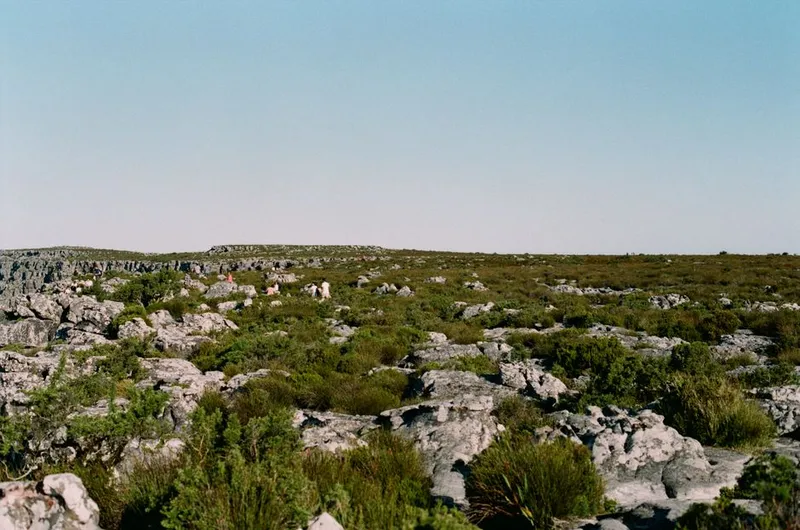
We hiked the Wolfberg Cracks route — a strenuous climb through a narrow rock fissure that opens onto the summit plateau, where the Wolfberg Arch stands like a sandstone gateway to nothing. The altitude here is roughly 1,600 metres. And crucially: there is signal. Weak, flickering, one-bar 3G. But signal.
This was the sync test. All four phones had accumulated two days of offline observations. Let us see what happens when we try to push that data through a connection that can generously be described as “theoretical.”
CyberTracker
Could not sync. CyberTracker does not sync over cellular. USB to Windows desktop only. This is architectural, and for a tool launched in 1996 it made sense at the time. In 2026, it is disqualifying. If you cannot push data off the device in the field, you are carrying a single point of failure in your pocket.
ODK Collect
Attempted to sync 89 pending submissions. The connection was 3G with roughly 80KB/s upload. Each submission included a photo — not large by modern standards, roughly 2MB each, but 89 of them is 178MB. At 80KB/s, that is approximately 37 minutes of continuous upload. The connection was not continuous. It dropped six times. ODK handles this well — the sync is checkpoint-resumable, each submission is an independent upload, and failed submissions are retried individually. After 53 minutes of standing on a rock holding the phone above my head, 84 of 89 submissions had uploaded. The remaining five were still queued, the photos too large to push through the intermittent connection. I made a note: ODK needs photo compression before upload.
SMART Mobile
The SMART phone was dead from Day Three. No sync possible.
FieldLog
Synced 84 records in under 2 minutes. This sounds like marketing. Here is why it worked: FieldLog syncs deltas — only changed rows move across the wire. Photos are compressed to 1920px on the long edge before storage, reducing average photo size from roughly 6MB to roughly 400KB. The sync protocol is chunked into batches of 20 records, each batch an atomic checkpoint. The connection dropped twice mid-sync. Both times it resumed from the last checkpoint without re-uploading completed batches.
This is what we built FieldLog for. And in this moment, standing on a sandstone plateau with one bar of 3G, watching data that had been trapped on a device for two days finally leave it, I felt the kind of satisfaction that makes you forget the sunburn.
But I also noticed what was missing: partial record sync. FieldLog syncs whole records or nothing. If an observation has a photo that fails to upload, the entire observation stays on the device. In ODK, the text data uploads and the photo retries separately. In a conservation context — where the text data (species, count, coordinates) is often more urgent than the photo — ODK’s approach is better. I made another note.
We ate lunch on the summit, watching Verreaux’s eagles — the same pair, I think — ride the updrafts along the cliff edge. The view stretched to the Tankwa Karoo in the east, a haze of heat and distance. A dassie watched us from a rock three metres away, utterly unafraid. I logged it on all four phones, just to see. CyberTracker: 3 seconds. ODK: 11 seconds. FieldLog: 4 seconds. SMART: still dead.
Day Five: The Rain
A cold front pushed through overnight. The temperature dropped from 35°C to 14°C in six hours. Rain began at 04:00 — steady, cold, the kind of rain that finds every gap in your tent fly. By 06:00 the campground was a series of puddles connected by mud. The baboons had retreated to the cliffs. Smart animals.
We ran a short transect anyway. Because in the field, you do not get to skip days because the weather is bad. The monitoring schedule does not care about your comfort.
Touchscreens in Rain
Capacitive touchscreens do not work when wet. Raindrops register as touches. The screen flickers between apps, zooms in and out, opens menus you did not want. You wipe the screen with your sleeve, which is also wet, which makes it worse. You wipe it with a dry cloth from a ziplock bag and get approximately 15 seconds of usable screen time before the rain reclaims it.
CyberTracker’s icon interface was again the most resilient. Large touch targets meant fewer mis-taps. The sequential navigation meant you could develop a rhythm — wipe, tap-tap-tap, confirm, pocket the phone — that minimized screen exposure. The phone got wet but the data got logged.
FieldLog was adequate. The rapid-logging mode worked once I found a rhythm, but I had to change the observation flow to use only the largest buttons and avoid dropdowns entirely. Dropdowns in rain are a special kind of frustration — the raindrop hits the list item above or below the one you want, and you cycle through wrong selections until you want to throw the phone into a river.
ODK Collect was almost unusable. The form was too dense, the touch targets too small, the validation too strict. I abandoned the ODK phone after 40 minutes and logged the rest of the transect on the other three devices alone. That is data loss. Not because of a software bug, but because the interaction model failed under environmental conditions that are routine for field work.
Waterproofness
None of the Tecno Spark Go phones are waterproof. I kept them in ziplock bags with the corners cut for the charging cable when needed, which is the universal field solution and also terrible. The charging ports on three of the four phones collected moisture. One phone — the ODK phone, ironically — stopped charging entirely around midday. I had to dry the port with a corner of shirt and wait an hour before it would accept a charge. If this had happened on Day One with no backup phone, the test would have been over.
Day Six: What Worked and What Didn’t
We spent the morning at camp, drying gear and reviewing the data. The sun had returned, the baboons had returned, and the cold shower felt less like punishment and more like absolution. Over coffee — real coffee this time, not the instant sludge of the previous five days — I wrote down everything.
What Worked
Offline-first architecture. Across all four apps, the basic promise held: you can log observations without signal. This should be table stakes, and it is. But the quality of the offline experience varied enormously. An app that lets you log offline but not view your data offline is only half-offline. CyberTracker and FieldLog got this right. ODK did not. SMART was dead.
Icon-based interfaces. CyberTracker’s icon grid was the single most field-appropriate design pattern we tested. Large, high- contrast, language-independent, usable in glare and rain. We are rebuilding FieldLog’s rapid-logging mode to use this pattern. Not because we want to copy CyberTracker — because CyberTracker got this right in 1996 and nobody else has caught up.
Delta sync with checkpoints. FieldLog’s sync was fast, resilient, and efficient. The checkpoint model — batch of 20, atomic commit, resume on failure — is the right architecture for patchy connections. ODK’s individual submission model was also resilient but slower due to photo uploads. The lesson: sync architecture matters more than any other technical decision in offline-first software.
Photo compression. FieldLog compressing photos to 1920px before storage saved the sync test. Full-resolution photos are unnecessary for species identification and habitat documentation. ODK’s lack of compression made sync painful and will cause problems for anyone on a data-limited plan in the developing world.
What Didn’t
Text-heavy forms in the field. ODK Collect is a form engine for surveyors, not a data collection tool for field biologists. The difference is not academic — it is the difference between data that gets logged and data that does not. Small text, dense layouts, and long dropdowns fail under sun, rain, and fatigue.
Desktop-dependent sync. CyberTracker requiring a Windows desktop for data extraction is a dealbreaker in 2026. I understand the history — this architecture was built before smartphones existed — but the failure to modernize the sync path is holding back what is otherwise an excellent field tool.
Heavy setup processes. SMART’s configuration complexity is a barrier. Two hours of desktop setup for a phone app that runs out of battery in four hours is a bad ratio. If the tool requires more time to configure than it can operate in the field, the tool is broken.
All-or-nothing record sync. FieldLog’s requirement that photos upload with the observation text means a failed photo upload blocks the text data. In conservation, the species and coordinates are often more time-sensitive than the photo. ODK’s approach — text first, photos async — is better. We are changing this.
Battery management. The SMART phone dying mid-morning on Day Three was a hardware failure compounded by software design. Continuous GPS tracking on a $50 phone with no battery optimisation is a predictable disaster. Any app that runs GPS continuously must have aggressive power management or it will not survive a full field day.
Sync state visibility. I almost lost data on Day Two because I did not realise the FieldLog phone had not synced. The sync pending badge was too subtle. A ranger in my position — tired, distracted, thinking about the leopard tracks he saw that morning — would absolutely miss it. Making sync state impossible to ignore is not annoying UX. It is honest software.
Day Seven: Departure and What We Changed
We packed camp at dawn. The baboons watched from the cliffs, no doubt planning their next breakfast raid. The Hilux was a layer cake of dust, damp gear, and dead phones. We drove the gravel road back to the N7, stopping at Cederberg Wines to buy two bottles of their Bukettraube — partly for the research value, mostly because we had earned it.
Here’s what this week taught us, and what we changed in FieldLog because of it.
1. Icon-Based Rapid Logging Mode
We are building a configurable icon grid for rapid species logging. Admin defines the icons during expedition setup. The field worker taps icons, not text. Three taps to a complete observation: species, count, submit. This is not a replacement for the full form — it is a fast-path for the 80% of observations that are routine. The full form remains for the 20% that need detail. CyberTracker proved this works. We are taking the lesson, not the interface.
2. Partial Record Sync
Observation text data now syncs independently of photos. If a photo fails to upload — timeout, network drop, storage limit — the text record (species, count, coordinates, timestamp) uploads anyway. The photo retries in the background. This means critical data reaches the server even on marginal connections. The photo follows when conditions allow.
3. Sync State That Cannot Be Ignored
The sync pending indicator is now a persistent banner at the top of every screen: “14 observations pending sync — Last synced: 2 hours ago.” When sync is pending and the user tries to close the app or log out, a dialog warns: “You have unsynced observations. If you continue, this data may be lost.” Bright red. Not subtle. Not optional.
4. GPS Mode Selection
FieldLog now offers two GPS modes: “Fast” (last known location, updates in background — faster observation logging, slightly lower accuracy) and “Precise” (fresh fix on every observation — the current behaviour). The user chooses based on their monitoring protocol. For rapid species counts on a known transect, Fast mode saves 2-3 seconds per observation and significant battery. For precise mapping of rare or endangered species, Precise mode provides the accuracy.
5. Battery-Aware Logging
The app now monitors battery level and temperature. At 20% battery, it reduces GPS polling frequency. At 15%, it dims the screen slightly. At 10%, it enters a “preservation mode” — GPS only on manual request, photo capture disabled, sync deferred. The user can override any of these settings, but the default is survival. A dead phone collects no data.
6. Offline Team Visibility (Roadmap)
This one we could not fix in a week. When the team is offline, each phone is an island. Nobody can see what anyone else has logged. In a coordinated survey, this leads to duplicated effort and missed coverage. Phase 2 of FieldLog includes LoRa mesh networking for offline team sync — phones talking to each other directly, sharing observations without internet. This trip made it clear that Phase 2 is not a luxury. It is essential.
What This Means
Here is what I believe after a week in the Cederberg with four phones and a notebook.
The best field data collection app in the world is not the one with the most features. It is not the one with the best AI. It is not the one with the prettiest interface or the most integrations or the biggest marketing budget.
It is the one that works when your hands are cold. When the sun is blinding. When the rain is falling. When the battery is at 14%. When there is no signal. When you are tired. When you are at kilometre 10 and the only thing you want to do is stop walking. The app that still lets you log the observation under those conditions — that is the one that collects the data that matters.
Everything else is noise.
CyberTracker understood this in 1996. It built an interface for San trackers who could not read, using icons and tap sequences, and it still works — offline, unbreakable, fast. But it never modernized the sync path, and it trapped its users behind a Windows desktop in a mobile world.
ODK built a rigorous form engine with excellent data validation and a huge community, but it optimized for survey methodology, not field biology. Its forms are too heavy, its offline data viewing is too limited, and its photo handling is too naive for the conditions in which it is deployed.
SMART built a law enforcement platform and called it a data collection tool. It is excellent at what it was designed for — ranger patrol management — and awkward at everything else. It is the right tool for a specific job, and almost no other job.
FieldLog is the youngest of the four. We have the advantage of learning from 30 years of other people’s mistakes, and the disadvantage of not having 30 years of our own field hardening. This trip showed us exactly where we are soft. The sync state visibility. The GPS latency. The all-or-nothing record upload. These are not bugs we found in code review. They are failures we experienced in the field, standing on a rock in the rain, watching a progress bar that should not exist.
We build FieldLog because we believe field data collection should be fast, reliable, and free. But belief is not enough. You have to go to the places where the tools will be used — the valleys with no signal, the slopes with no shade, the campsites with baboons in the breakfast — and you have to use them until they break. Then you fix them. Then you do it again.
This is not a product launch. It is a field report. The bugs are real. The fixes are in progress. The commitment is unchanged: build tools for the people who do the work, in the places where the work happens, under the conditions those places impose.
And if you are building field software yourself: go to the Cederberg. Or wherever your users are. Leave the emulator behind. Bring the cheap phone. Stand in the sun. Get rained on. Watch the battery die. Your software will tell you the truth about itself. You just have to be willing to listen.
Field Log is a field-first mobile platform built by The Field Company. Offline-first. Team sync. Structured forms and rapid logging. Free to start, your data stays yours.
Get started at fieldlog.thefieldco.com
. For more on building conservation technology that respects the people doing the fieldwork, read
What We Learned Building Offline-First Software for the Field
.