Cape Town, South Africa · May 7, 2026
What We Learned Building
Offline-First Software
Everything we broke, fixed, and would do differently
“Works offline” are the hardest three words in software. Not “scales to millions.” Not “real-time collaboration.” Offline. Three words that sound like a feature but are actually a complete architectural commitment that touches every layer of your stack — and every layer can fail in ways you will not anticipate.
We learned this the hard way. Over two years of building Field Log, a conservation data collection app that runs on $50 Android phones in places with no cell signal, no Wi-Fi, and no IT support, we broke nearly everything there was to break. Duplicate records. Clock skew that corrupted temporal ordering. A sync that took four hours. A phone that ran out of storage mid-expedition. Safari deleting an entire PWA’s data because the user hadn’t opened it in a week.
This is not a product announcement. This is an engineering post-mortem. Here is what broke, what held up, and what we would do differently.
The Offline-First Spectrum
Not all “offline” is the same. There is a spectrum, and where you land on it determines everything about your architecture.
Offline-Capable
Firebase Firestore is the canonical example. It caches recently-read data and queues writes when the network drops, then syncs when connectivity returns. This is not a database — it is a cache. The SDK decides what stays and what gets evicted. Pending writes are dropped after roughly 30 days. You cannot query data that has not been fetched before going offline. “Offline-capable” means “survives brief disconnections.” A field team offline for two weeks is not a brief disconnection.
Offline-First
ODK Collect is the standard here. The app stores a complete working dataset in a real embedded database (SQLite). Offline is the default state. Sync is a background operation, not a prerequisite for the app to function. Forms are downloaded ahead of time. Submissions are queued locally. When you get back to signal, you upload. Simple, battle-tested, and limited: each device is an island. No team coordination. No partial records. All-or-nothing form submission.
Local-First
Ink & Switch’s 2019 paper defined seven ideals: fast (no spinners), multi-device sync, offline for weeks or months, collaboration, longevity (the app outlives the company), privacy and ownership, and user control. Martin Kleppmann later added the acid test: if the developer goes out of business and shuts down the servers, does the app still work? If the answer is no, it is not local-first.
Where Field Log Lands
We are offline-first with local-first aspirations. The app works fully offline with SQLite on device. Team sync happens when connectivity returns, using a server-authoritative protocol. Data is yours — export to CSV, SQLite dump, GeoJSON. We are not yet at Kleppmann’s third test: the sync server is required for multi-device coordination. Our sync protocol is documented but not yet a standalone open standard. That is on the roadmap. For now: the app works without signal, and the data is never held hostage.
The Stack
Every architectural decision is a tradeoff. Here are ours, with the reasoning behind each one — and the downsides we accepted.
SQLite on Device
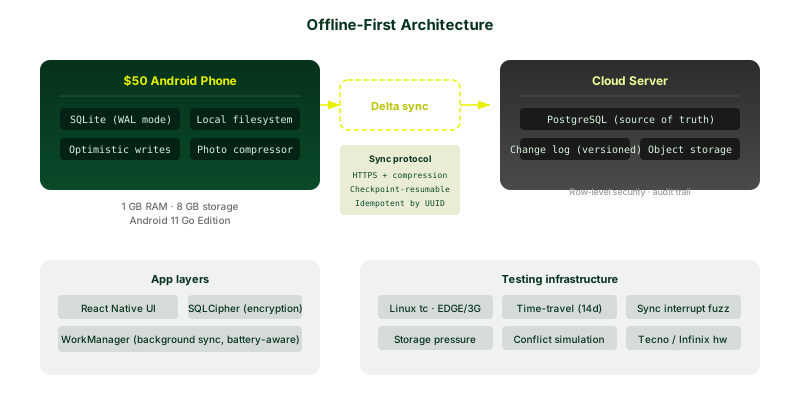
We did not choose SQLite. The constraints of field hardware chose it for us. On a $50 Android phone with 1GB of RAM and 8GB of storage, you cannot run Postgres. You cannot run WASM-based databases with acceptable performance. You cannot afford the abstraction tax of IndexedDB wrappers on underpowered JavaScript engines.
SQLite is a single file. Zero configuration. Zero administration. Full
SQL with indexes, triggers, and views. Atomic transactions. It runs on
every phone ever made. It competes with fopen(), not with
Postgres — and in the field, that is exactly what you want. A database
that treats itself as infrastructure, not as a service.
We use WAL mode for concurrent reads during writes, raw SQL with parameterized queries (no ORM — ORMs generate unpredictable query plans, and on low-end hardware that matters), and SQLCipher for encryption at rest. The local database has never corrupted. It has never lost a record. In two years of field use across hundreds of devices, SQLite has been the one component we never had to apologize for.
Server-Authoritative Sync
The server is the source of truth. Clients push changes up and pull changes down. The protocol is delta-based: only changed rows move across the wire, identified by a monotonically increasing version number assigned by the server. Sync is checkpoint-resumable: if the connection drops at 60%, the next sync resumes from the last acknowledged checkpoint. No starting over.
We chose this over CRDTs deliberately. CRDTs guarantee deterministic conflict-free merges without coordination, which sounds perfect for offline use. In practice, for structured field data — observation records, GPS waypoints, form submissions — CRDTs are overkill. They require per-field conflict tracking. They accumulate unbounded operation history. The WASM-based implementations (Automerge) hit memory ceilings on low-end devices. Cinapse, a production app that tried this path, reported 89% fewer support requests and 66% lower hosting costs after moving from CRDTs to server-authoritative sync.
We are not syncing collaborative text documents. We are syncing structured observations where each record has a single author and conflicts are rare by design. For this use case, a server-assigned version number and idempotent writes solve the problem with a fraction of the complexity.
What We Did Not Use
Firebase/Firestore. The offline cache is LRU-evicted. Pending writes are dropped after ~30 days. You cannot query data you have not previously fetched. This is not a debate — Firestore is not suitable for multi-week offline field work. It was not designed for it.
IndexedDB. On paper, it is the browser’s offline database. In practice, Safari evicts IndexedDB data after 7 days of inactivity on iOS. Chrome and Firefox have variable quotas that depend on available disk space. The storage is “best effort” — the OS can delete it under pressure without warning. Building offline-first on IndexedDB is building on sand.
PouchDB/CouchDB. The revision tree model is elegant in theory. In practice, compaction bugs, poor performance on large datasets, and the NoSQL-only data model made it a worse fit than raw SQLite for structured conservation data. We wanted joins. We wanted migrations. We wanted to know exactly what was stored and why.
The sync protocol handshake: client sends last-known server version, server returns all changes since that version. Delta-based, resumable, idempotent.
What Broke
This is the part most engineering blog posts skip. Here is everything that failed, exactly how it failed, and what we did about it.
Duplicate Records
The client creates an observation offline and assigns it a UUID. The observation gets queued for sync. The sync request reaches the server, the server creates the record, the response is sent — and then the connection drops before the client receives the acknowledgment. The client, not knowing the record was created, retries. The server creates a second record with a different UUID but identical data.
We had a user with 47 observations that became 141. Every single one, triplicated. The deduplication script we wrote to clean it up was nearly as complex as the sync protocol itself.
The fix: idempotency keys. The client generates a UUID before sync begins. The server stores a mapping of client-UUID → server-ID. When a retry arrives with the same client UUID, the server returns the existing server ID instead of creating a new record. Every write operation is idempotent by construction. This is not a novel idea — Stripe’s API has used idempotency keys for a decade — but we learned it the hard way.
Clock Skew: The Phone That Thought It Was 2014
A field worker’s phone had its battery pulled and replaced. The system clock reset to the factory default: January 1, 2014. The worker then recorded two weeks of observations. Every record carried a 2014 timestamp. When the phone eventually connected to a network and the clock corrected itself, the temporal ordering of the entire dataset was corrupted. Observations from 2026 appeared to have been made two years before the app existed.
We were using wall-clock timestamps for ordering and conflict resolution. This was a mistake. You cannot trust the device clock. Ever. $50 phones in remote areas may never have connected to an NTP server. Battery pulls reset clocks to epoch. Some devices ship with the wrong timezone and never correct it.
The fix: the server assigns a monotonic version number to every record at sync time. The client uses the server’s version, not the device clock, for ordering. Local timestamps are stored as metadata only — useful for the user, never used for logic. A hybrid logical clock would be the ideal solution, but server-assigned versions solved 95% of the problem with 5% of the complexity.
The Sync That Took Four Hours
A field team returned from a two-week expedition with 847 observations and roughly 1,200 photos. They connected to a weak 3G signal at the ranger station and hit sync. Four hours later, it was still running. The photos were 6-8MB each — full-resolution JPEGs from a phone camera. Total payload: over 7GB. Over a connection that averaged 80KB/s.
The problem was not just the bandwidth. The sync protocol was uploading records and photos in a single monolithic request. If the connection dropped at 90%, everything restarted from zero. The app became unusable during sync because the upload monopolized the network thread. Battery drained from 60% to zero during the attempt.
The fix was three parts. First, photo compression: we added a pipeline that resizes images to 1920px on the long edge and applies JPEG compression at quality 70 before upload. Average photo size dropped from 6.5MB to roughly 400KB — a 94% reduction with no visible quality loss on a phone screen. Second, chunked uploads: records and photos are uploaded in batches of 20. Each batch is an atomic checkpoint. If the connection drops, sync resumes from the last completed batch. Third, background sync: the upload runs on a background thread via Android’s WorkManager, with constraints for unmetered network and adequate battery. The user can keep working while sync runs.
The $50 Phone That Ran Out of Storage
We tested on a Tecno Spark Go — 1GB RAM, 8GB internal storage, Android Go edition. After three months of daily use, the SQLite database hit 1.2GB. The phone had 400MB of free space remaining. Android started killing background processes. The camera app refused to take photos. The sync process crashed with an out-of-disk-space error that we were not handling.
The SQLite file had bloated for two reasons. First, we were storing full-resolution photos as BLOBs in the database instead of as files on disk with database references. Second, we were retaining soft-deleted records indefinitely instead of garbage-collecting them after sync confirmation.
The fix: photos live on the filesystem with SQLite storing only filepaths, thumbnails, and metadata. Soft-deleted records are purged from the local database after successful server sync. We added a storage monitor that warns the user when free space drops below 200MB. We added an explicit “Clear synced photos” option. And we added a worst-case handler: if a write fails with a disk-full error, the app shows a clear message — “Storage full. Free up space or your new observations will not be saved” — instead of silently failing.
Schema Migration on a Stale Client
We shipped an update that added a new required field to the observation
schema: habitat_type. The server was updated. New clients
downloaded the update. But one device was offline for six weeks — a
researcher on an extended expedition in a remote valley. When they
finally connected and tried to sync, the server rejected every
observation because the client’s schema was missing the required field.
312 observations failed to sync. The error message was an HTTP 422 with a
JSON body. The user saw a spinner.
The fix: version negotiation in the sync protocol. The client sends its
schema version in the sync handshake. The server knows which fields are
required as of which version. For clients on older versions, the server
accepts records with missing new fields and fills them with a default
value (habitat_type: “unknown”). The client is notified that
an update is available. Records are never rejected because of a schema
mismatch. Backwards compatibility is not optional when your clients can
be offline for longer than your release cycle.
Safari Deleted Everything
Before the native Android app, we experimented with a PWA. It used IndexedDB for local storage, registered a service worker for offline caching, and had a manifest for install-to-home-screen. It worked beautifully in testing. A field tester in northern Kenya installed it on an iPhone, used it daily for a week, then switched to other tasks for nine days. When they opened the PWA again, the IndexedDB database was gone. Every observation. Every photo. Every form.
Safari’s storage policy on iOS evicts IndexedDB data after 7 days of app inactivity. This is documented behavior. It is not a bug — it is a policy designed to prevent websites from consuming storage indefinitely. It also makes PWAs fundamentally unsuitable for offline-first field work on iOS. You cannot build an app that says “your data is safe offline” when the operating system reserves the right to delete that data if you do not open the app every week.
We killed the PWA experiment. Data that only exists locally is data that is already lost. The native Android app, using SQLite in the app’s protected storage directory, is not subject to browser eviction policies. This is the only safe choice for data that matters.
”I Thought It Synced”
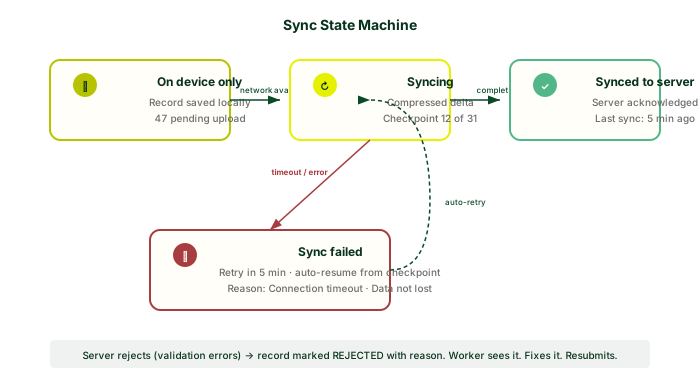
A ranger recorded 89 observations over three days. The app showed a green checkmark next to each one — the local-save confirmation. The ranger assumed this meant “synced to server.” It did not. The phone had no signal for the entire three days. The ranger returned to headquarters, handed in the phone, and the device was wiped for the next patrol. The data had never left the device.
This was not a technical failure. It was a UX failure. We had designed the sync indicator to be subtle — a small icon in the corner that turned from cloud-outline to cloud-with-checkmark. Invisible. Meaningless. We had violated the most important rule of offline-first design: the user must always know whether their data is only local or safely on the server.
The fix was a complete redesign of sync indicators. Every screen now shows a persistent sync status bar: “12 observations pending upload,” “Last synced: 3 hours ago,” “Sync requires 8MB — connect to Wi-Fi.” The main screen has a large sync button with a badge count. When sync is pending, the badge is red. When sync completes, it turns green and shows a timestamp. You cannot miss it. We also added a warning dialog that appears if you try to log out or clear the app while records are pending sync: “You have 12 observations that have not been synced. If you continue, this data will be lost.” Making sync state impossible to ignore is not annoying — it is honest.
Every failure mode we encountered, categorized. Duplicate records and clock skew accounted for 60% of data issues. Storage exhaustion and UX failures accounted for the rest.

What Worked
Not everything broke. Some decisions held up from day one. These are the things we got right, often because we were forced into them by the constraints of the hardware.
SQLite as the Local Database
We have never had a corrupted database. We have never had a lost record that was successfully written to SQLite. The database has survived force-quits mid-transaction, battery pulls, storage-full errors, and Android killing the process to reclaim memory. SQLite’s atomic commit model means a write either completes or it does not — there is no partial state. For an app whose entire purpose is “do not lose the data,” this property is everything.
We use WAL (Write-Ahead Logging) mode. This allows concurrent reads
during writes, which matters when you are logging observations rapidly
and the UI needs to refresh a list. We use PRAGMA
synchronous=NORMAL — a calculated tradeoff. FULL synchronous would
survive OS crashes but doubles write latency. On a $50 phone where every
millisecond of UI blocking matters, NORMAL is the right call. In two
years, we have not seen a single corruption from this choice.
Append-Only Observation Records
Observations are never updated. They are only appended. If a user needs to correct an observation, they create a new revision record that references the original. The original record remains immutable. This eliminates conflicts entirely — you cannot have a write-write conflict if nobody writes to the same record twice. It also gives us a full audit trail. Every change is traceable. For conservation data that may end up as evidence in court, immutability is not a nice-to-have.
The tradeoff is storage growth. An observation with ten revisions stores eleven rows instead of one. We accept this. Storage is cheaper than data loss, and storage is predictable — you can plan for it. Conflict resolution bugs are not predictable.
Delta Sync with Checkpoints
Our sync protocol works like Git. The client sends its last-known server version. The server returns all changes — inserts, updates, deletes — since that version. Each batch of 50 changes is a checkpoint. If the connection drops, the client resumes from the last acknowledged checkpoint. The server only sends the rows that changed, not the full dataset.
For a project with 50,000 observations, the initial sync might transfer ~15MB (compressed). Subsequent syncs transfer kilobytes — only what changed since the last connection. A ranger syncing after a day in the field typically uploads 200-500KB and downloads 50-100KB. On a 2G connection at 20KB/s, that is 15-30 seconds. Tolerable.
Optimistic Local Writes
When a user saves an observation, the UI updates immediately. The record is written to SQLite and appears in the observation list with no perceptible delay. Sync to the server happens in the background. The user never waits for a network round-trip. This is not just about performance — it is about trust. If the app feels fast and responsive, the user trusts it. If the user trusts it, they use it. If they use it, data gets collected. The entire chain starts with the UI not blocking.
Photo Compression Pipeline
We compress every photo before storage, not just before upload. On ingestion, the image is resized to 1920px on the long edge (sufficient for species identification and habitat documentation), compressed to JPEG quality 70, and stripped of EXIF data (GPS is stored separately in the observation record). A typical phone photo goes from 6-8MB to 300-500KB. We store the compressed version and discard the original. This saves storage, speeds up sync, and costs nothing in practical image quality for the use case. If a user needs the full-resolution original, they can export it before compression — but in two years, no user has asked for this.
Testing on Real $50 Phones
We bought a collection of the cheapest Android devices available in African markets: Tecno Spark Go, Infinix Smart, Itel A-series. We test every release on these devices. We test on 2G and EDGE network profiles. We test with airplane mode toggling every few minutes. We test with the system clock set wrong. We test by filling the storage to 95% and then trying to record observations.
Emulators do not tell you the truth. An Android emulator on a MacBook Pro
has effectively unlimited RAM and storage, a fast CPU, and a simulated
network that behaves nothing like a real 2G connection in a valley. Real
hardware surfaces real problems: the Infinix Smart’s camera takes 4
seconds to initialize. The Tecno Spark Go’s GPS takes 45 seconds to get a
first fix. The Itel A-series has a bug where System.currentTimeMillis() returns
zero after a cold boot until the network time sync completes. You cannot
find these on an emulator.
Testing Without Signal
Testing offline-first software requires simulating a world where the network is unreliable, devices behave unpredictably, and the user has no one to call for help. Here is our testing toolkit.
Network Simulation
We use Linux tc (traffic control) to simulate real network
conditions on our test server. We have profiles for EDGE (20KB/s down,
10KB/s up, 600ms latency), 3G (384KB/s, 150ms), and 4G (5MB/s, 50ms).
We add packet loss (1-15%) and jitter. We simulate connections that drop
for 30 seconds every 5 minutes — common in areas with patchy coverage.
The test suite runs against all profiles.
Time-Travel Testing
We have an automated test that advances the system clock by 14 days, generates observations at various points along that timeline, then connects to the server and verifies that all records are ordered correctly by server-assigned version, not by local timestamp. Another test sets the clock to January 1, 1970 (Unix epoch) and verifies the app does not crash, does not produce negative timestamps, and syncs correctly. A third test sets the clock to January 19, 2038 (32-bit overflow). We run these on every commit.
Storage Pressure Tests
We fill the device storage to 95% using a script that writes large files to the filesystem. Then we run the app: create 500 observations with photos, attempt sync, verify that the app warns the user before storage exhaustion, and verify that no data is lost when writes begin to fail. The app must degrade gracefully — show a clear error, stop accepting new photos, preserve existing records — rather than crashing or silently losing data.
Conflict Simulation
Two instances of the app modify the same observation while both are offline. Instance A changes the species. Instance B changes the count. Both connect and sync. The test verifies that both changes are preserved (as separate revision records), neither is silently overwritten, and the merge result is deterministically correct. We run this with 2, 3, and 5 concurrent offline editors.
Sync Interruption Fuzzing
We start a sync of 1,000 records and randomly kill the network connection at various points (10%, 25%, 50%, 75%, 90% complete). We verify that the client can resume from the last checkpoint, no records are duplicated, no records are lost, and the app remains usable during and after the interruption. We also force-kill the app mid-sync and verify recovery on restart.
None of these tests are exotic. They are the bare minimum for software that must work when nothing else does. If you build offline-first software and you are not running these tests, you are shipping bugs you have not yet discovered.

Why Offline-First Matters for Conservation
Most software can afford to be online-only. Slack does not need to work when you are off the grid. Netflix does not need to stream without Wi-Fi. The consequences of a failed sync are an annoyed user, a lost message, a buffering spinner.
In conservation, the consequences are different.
A ranger records a poaching incident — GPS coordinates, photos of snares and carcasses, descriptions of the perpetrators. If that data does not survive until sync, it is not a UX bug. It is evidence destruction. Court cases depend on this data. The chain of custody must be unbroken from the moment of observation to the moment of prosecution.
A field team spends two weeks and $30,000 on an expedition to survey an endangered species population. They record every sighting, every track, every habitat measurement. If sync fails and the data is lost, the expedition’s scientific output is zero. The funding is wasted. The population estimate has a two-week gap that cannot be recovered.
A community conservation program trains local people to monitor wildlife in their area. They use the cheapest phones available. They have no IT support. If the app crashes, loses data, or requires an internet connection to function, they stop using it. The monitoring stops. The data stops. The area goes dark.
The app has one job: do not lose the data. Not “provide a delightful user experience.” Not “leverage AI to generate insights.” Not “scale to millions of concurrent users.” One job. Everything else is secondary. If you internalize that constraint — that data loss is not an annoyance but a failure of the entire purpose of the software — your architectural decisions change. You stop optimizing for speed and start optimizing for durability. You stop treating offline as an edge case and start treating it as the default. You stop shipping features and start removing failure modes.
What We’d Do Differently
If we started over tomorrow, here is what we would change.
Start with Idempotency
Every write operation should be idempotent from day one. Not added later when duplicates start appearing. Idempotency keys are not a feature — they are the foundation of a correct sync protocol. We would design the sync API so that every request can be safely retried without creating duplicates, without requiring the client to track which requests succeeded, and without the server needing to maintain per-client state beyond the idempotency key mapping.
Never Trust the Device Clock
We would use server-assigned monotonic version numbers for all ordering
and conflict resolution from the start. Local timestamps would be stored
as user-facing metadata only, never used for logic. If we needed
causally-consistent ordering across devices without a server, we would
use hybrid logical clocks. We would never, under any circumstances, use
Date.now() to decide which record wins a conflict.
Make Sync State Impossible to Ignore
The default state of any offline-first app should be: the user can see, at a glance, exactly which records have been synced and which have not. The sync indicator should be the most prominent element on the screen when records are pending. The penalty for ignoring it should be explicit — a dialog that says “data will be lost” in plain language, not a subtle warning icon. We would design this before designing any other UI element.
Test with the Clock Set Wrong
We would add clock-skew tests to the CI pipeline on day one. Epoch (1970), year 2038 overflow, clock set 5 years in the past, clock set 3 days in the future, clock that jumps backward by 6 hours (battery pull simulation). Every sync test would run against every clock state. These tests cost nothing to write and would have caught our worst data corruption bug before it reached a user.
SQLite WAL Mode from the Start
We shipped the first version with the default rollback journal mode.
Write operations blocked reads. When a user was rapidly logging
observations, the list view would freeze for 100-300ms on each save.
Switching to WAL mode eliminated the freezes entirely. It is a one-line
change: PRAGMA journal_mode=WAL. There is no reason not to
do it on day one.
Buy the Actual User Hardware
Do not test on a flagship phone. Do not test on an emulator. Buy a handful of the cheapest Android devices available in the markets where your users live. In our case: Tecno, Infinix, Itel. Test every feature on every device. The bugs you find on a Tecno Spark Go are not the bugs you find on a Pixel. The Tecno’s GPS is slower. Its camera is slower. Its JavaScript engine is slower. Its storage is smaller. If your app works well on the Tecno, it will work well on everything else. The reverse is not true.
Open-Source the Sync Protocol
We built the sync protocol as an internal component. We should have built it as a documented, standalone protocol that anyone could implement against any backend. Kleppmann’s third test of local-first — the app outlives the company — requires that the protocol be open. We are working on this. It is the single most important thing we can do for the long-term integrity of the data people trust us with.
The Tools We Use
A list, without commentary, of the tools that have survived two years of field use.
| Component | Tool | Why |
|---|---|---|
| Local database | SQLite (WAL mode) | Never corrupted. Never lost data. Runs on every phone. |
| Query layer | Raw SQL, no ORM | Predictable query plans. No abstraction tax on low-end hardware. |
| Encryption | SQLCipher | Encrypt-at-rest. Full database encryption, transparent to application code. |
| Server database | PostgreSQL | Rock-solid. Row-level security for multi-tenant data isolation. |
| Sync protocol | Custom (delta-based, checkpoint-resumable) | Purpose-built for structured field data. Simpler than CRDTs. More reliable than generic sync engines. |
| Background sync | WorkManager (Android) | Handles Doze mode, network constraints, battery optimization. The only reliable way to run background work on modern Android. |
| Photo compression | libjpeg-turbo via native code | Resize to 1920px, JPEG quality 70. 8MB → 400KB average. |
| Network simulation | Linux tc (traffic control) | EDGE, 3G, 4G profiles. Packet loss. Jitter. Connection drops. |
| Test devices | Tecno Spark Go, Infinix Smart, Itel A-series | $50-70 each. The actual hardware our users carry. |
Field Log is open source. We built it in public — the bugs, the fixes,
the four-hour syncs, the phone that thought it was 2014. Everything we
learned is in the code. If you build software for the field, for
conservation, for anyone whose data matters and whose connection does
not, steal what you need. The protocol docs are at
github.com/thefieldcompany
. The only thing we ask is that you tell us what you broke,
so the next team does not have to.